
Appearance
PTPTN / SSPN
DANGER
This API is only applicable if product code is “PTPTN”
PTPTN offers four types of products:
| Product Name | Categories | Sub Product Code |
|---|---|---|
| Konvensional | PTPTN | K |
| Ujrah | PTPTN | U |
| SSPN Prime | SSPN Prime | S |
| SSPN Plus | SSPN Prime | SP |
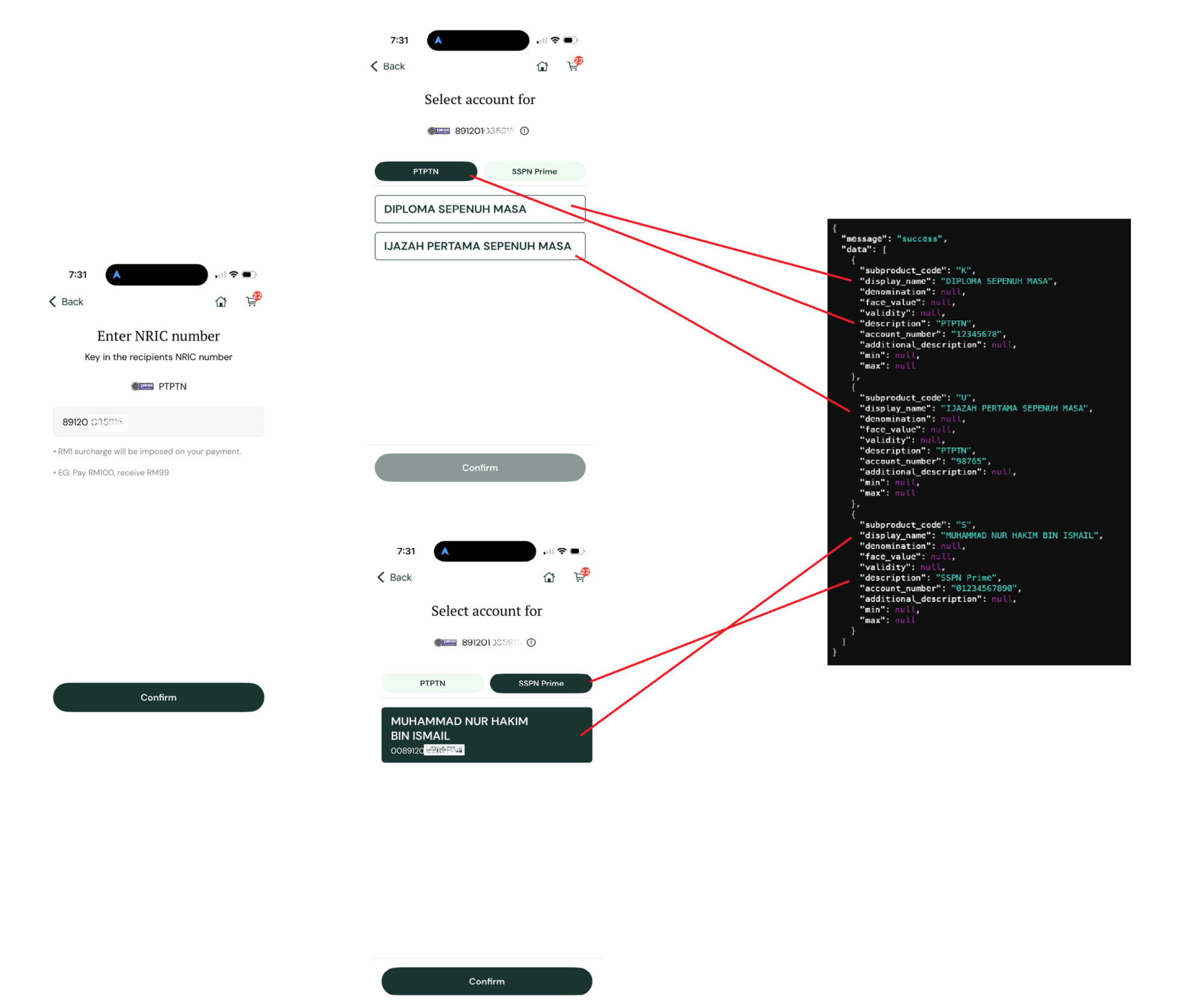
How to show and use the data:
Look at the
**description**for each item in the API data to know its category.List items under their category. Some users may have multiple accounts associated with their NRIC number
Retrieve the
**account_number**: Get the correspondingaccount_numberfrom the API response.Pass to Payment: Use this retrieved
account_numberin your "Step 5: Make Payment" process.
API Endpoint
http
GET https://api.iimmpact.com/v2/subproductsRequest Headers
| Header | Description | Required |
|---|---|---|
Authorization | ID Token | No |
Query Parameters
| Parameter | Type | Required | Description |
|---|---|---|---|
product_code | String | No | Product Code |
account_number | String | No | NRIC |
Response 200
| Field | Type | Description |
|---|---|---|
message | string | |
data | array | |
data[].subproduct_code | string | subproduct_code. Required value to pass in Step 5: Make Payment |
data[].display_name | string | Display name for the list |
data[].denomination | string | Not Applicable |
data[].face_value | string | Not Applicable |
data[].validity | string | Not Applicable |
data[].description | string | Categories |
data[].account_number | string | Account no. Required value to pass in Step 5: Make Payment |
data[].additional_description | string | Not Applicable |
data[].min | string | Not Applicable |
data[].max | string | Not Applicable |
Example Response:
json
{
  "message": "success",
  "data": [
    {
      "subproduct_code": "K",
      "display_name": "DIPLOMA SEPENUH MASA",
      "denomination": null,
      "face_value": null,
      "validity": null,
      "description": "PTPTN",
      "account_number": "12345678",
      "additional_description": null,
      "min": null,
      "max": null
    }
  ]
}