
Appearance
Step 4: Bill Presentment (Beta)
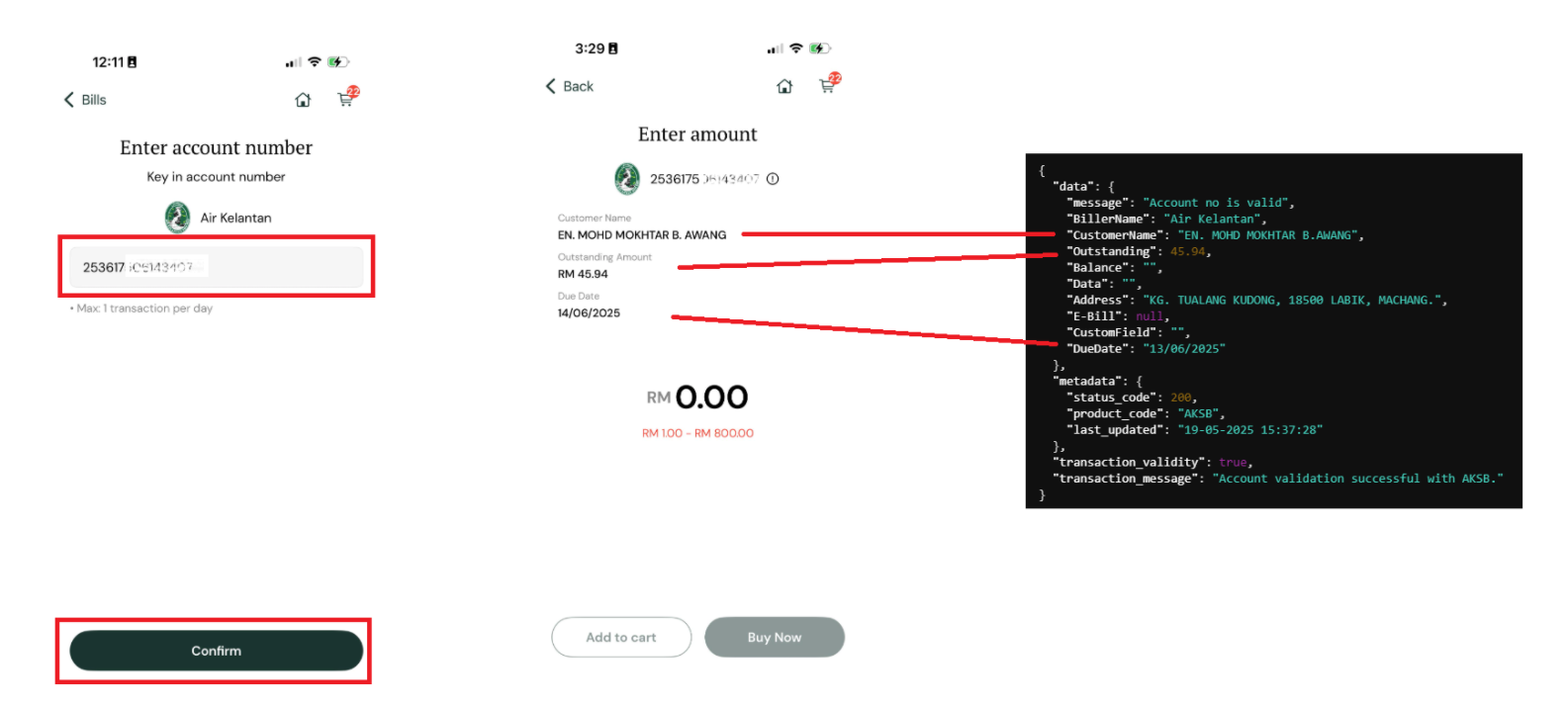
Before processing a payment, use the Bill Presentment API to retrieve and display outstanding bill information for the user's account. This enables your application to show current bill details, send bill reminders, and automate recurring payments.
API Reference
For the full endpoint specification (headers, parameters, response schema, and examples), see Bill Presentment API Reference.
Integration Guidelines
Integrate this API across all products. This prevents the need to reintegrate when a new biller is added later.
Your application should dynamically populate the bill information based on the API response. If a particular piece of information — such as customer name — is not returned by the API for a biller, that label or field should not be displayed to the user.
Error Handling
API Response (data.message) | Application Action | Can User Proceed to Payment? |
|---|---|---|
Account no is valid | Display relevant bill information. Only show fields that are returned. | Yes |
Bill presentment is unavailable for this product | Do not display any bill information. | Yes |
Service unavailable. Please try again later | Do not display any bill information. | Yes |
Invalid account no | Show error_message to the user (see below). | No |
| Any other error | Do not display any bill information. | Yes |
Possible error_message values:
The provided biller code is invalidThe provided amount is invalidInvalid account noRef-2 is required